
Product Engineering - Quality Management
Quality Management introduction
Quality Management is designed as a framework-type solution. Its main feature is flexibility and the ability to create a measurement for any type of process in the application. The disadvantage of such a design is that the setup is more complicated compared to a fixed process-type solution. Quality Management addresses that disadvantage by providing out-of-the-box templates for specific processes.
The Purchase Receipt process is used as an example, as it is one of the most common applications for Quality Management. It is important to emphasize that this is just an example process: modify it as required and use it as a starting point to create similar processes such as production output inspection, sales returns inspection, or just to capture dates for measuring the performance of the shipping department.
The setup of Quality Management is based on a three-step process:
- First, register an Incident.
- From the incident, create a Measurement.
- When completed, copy the measurement to a Registered Measurement.
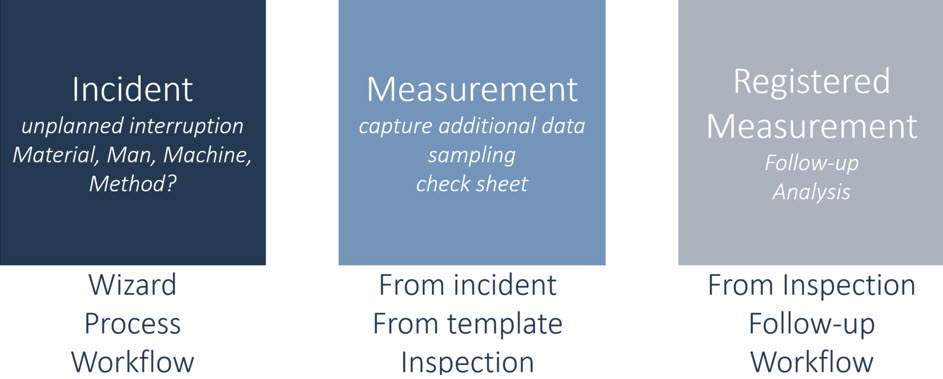
Quality Management features
- Create Incident wizard covers all standard Dynamics Business Central documents.
- Process triggers based on subscriptions to published events, with an SDK to create your own.
- Integrated in the manufacturing process through standard tasks. An operation status change can trigger a measurement.
- Serial and lot number blocking during inspection. Serial and lot number information updated with measurement result status.
- Supports AQL method to statistically determine the result status of an inspection.
- User-defined check sheets support questions of type: Boolean, Lookup, Numeric, and Text.
- Parent questions expand additional questions in the check sheet when required.
- Set several numeric tolerance levels: Accepted, Ambiguous, Rejected: each level with its own score.
- Rated check sheets resulting in Good, Average, or Bad to support the inspector's decision.
- Follow-up action for Purchase Returns and Relocate Inventory.
- Skip logic to save on inspection costs by setting inspection patterns for items based on the item's ABC classification.
- Simple setup, for example, the steps to inspect an item upon receipt:
- Select or create a measurement template (example: PUR-RECEIPT).
- Optionally update the user defined fields.
- Optionally update the sampling method.
- Optionally update the question set.
- Create an item template, insert the item no. and, optionally, vendor no. and the PUR-RECEIPT measurement template.
- Select or create a measurement template (example: PUR-RECEIPT).
See also
Tasks
- How To : Setup Quality Management
- How To : QM Subscribers
- How To : Setup a Measurement Template
- How To : Measurement Template Examples
- How To : Process a Measurement
- How To : Complete a Check sheet
- How To : Setup User Defined Fields
- How To : Create and maintain Questions
- How To : Create and maintain Question Sets
- How To : Use the Item and Variant Target Values for questions
- How To : Use the Target Templates
- How To : Use the Create Incident wizard
- How To : Follow up a Registered Measurement
- How To : Close an Incident
- How To : Run Item Classification
- How To : Run Skip Logic
- How To : User Tasks for Incidents and Measurements
- How To : Quality Management Bin for Put-away
Reference
- Product Engineering
- Getting Started with Product Engineering
- Design Detail : Incident Entries
- Design Detail : Acceptable Quality Levels
- Design Detail : Check Sheet Rating
- Design Detail : Manufacturing Integration
- Design Detail : Serial and Lot number blocking
- Design Detail : Skip Logic
- Walkthrough : Questions and Target Values
- Walkthrough : Purchase Receipt Quality Process