
Product Engineering - Quality Management
Design Detail : Check sheet rating
Quality Management features the option to rate check sheets. This assists the inspector in establishing the result of the inspection and builds up history for future analysis and reporting.
The rating function calculates a weighted average for the check sheet based on the following settings:
Question Weight: set the relative importance of a question within the scope of a question set.
Question Score: put a score value on an answer. Actual settings are based on the different types of questions:
Boolean: score as per the target value, which is either yes or no.
Numeric: the target value results in the highest score. On the Question Tolerances fast tab, specify the tolerance range and how they qualify the answer (Accepted, Ambiguous, Rejected). To find the score and result status, the tolerances are processed from the top down to find the first matching line.
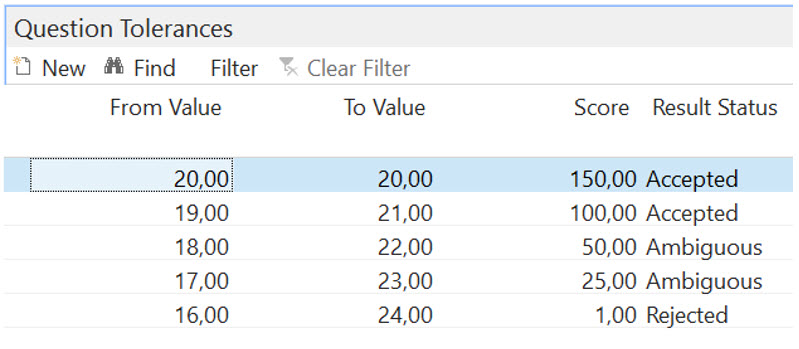
For this example, the target value is 20 and therefore gets the highest score. From 19 to 21 is still an accepted tolerance but scores lower. The same applies to the 18–22 and 17–23 ranges, in some situations still acceptable (Ambiguous), but resulting in different scores. The range 16–24 (and anything outside that range) means Rejected.
Lookup: score each possible answer. When the target value is checked, it means Accepted; otherwise the result status is Rejected, but it might still add to the score.
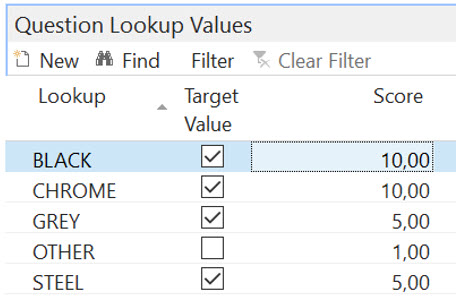
Black and Chrome are the preferred lookup values as they score the highest. Grey and Steel still result in an Accepted status but score lower.
Text: cannot be scored but must be filled for an Accepted result. An empty field means Rejected.
In the check sheet, the line score is calculated for each answered question as: Question Weight * Question Score. As part of the Complete action, the weighted average is calculated as: Total Line Score / Total Question Weights. With the weighted average, select the Good, Average, or Bad rating as per the rating set in the measurement template.
- Good means the check sheet can be accepted because all target values are met.
- Average means an Accepted or Rejected decision is required because some of the target values are not met or are Ambiguous.
- Bad means the check sheet is rejected because none of the target values are met.
Set question weights in the Question Set page:
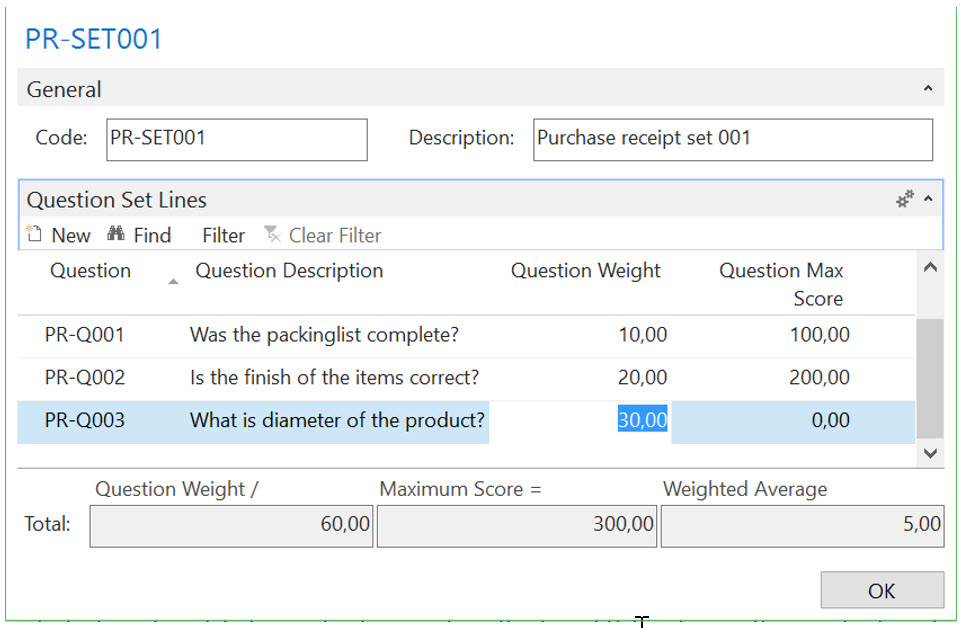
Maintaining the question weights per set allows you to assign the weight values so that the relevant importance of the question within the set is recognized. The maximum score is retrieved from the question to calculate a weighted average to assist in setting the rating ranges on the measurement template.
See also
Tasks
Reference