
Business Integration Solutions documentation
Record Handlers
A record handler enables customizations for a specific table of an internal document through interfaces.
The following interfaces expose data manipulation when a RECORDGENERATOR activity runs:
| Interface | Description |
|---|---|
BISIOnBeforeProcessRecord |
Executes functions or manipulates field values before the record validates and updates. An example is a general journal line that needs a special document number. In the method this interface exposes, the field values are set but not yet validated. |
BISIOnInsertRecord |
Overrides the Insert trigger of a record. BC runs the OnInsert trigger of a record by default. Note: the record does not insert if this trigger does not perform an explicit INSERT statement. |
BISIOnModifyRecord |
Overrides the Modify trigger of a record. BC runs the OnModify trigger of a record by default. Note: the record does not modify if this trigger does not perform an explicit MODIFY statement. |
BISIOnDeleteRecord |
Overrides the Delete trigger of a record. BC runs the OnDelete trigger of a record by default. Note: the record does not delete if this trigger does not perform an explicit DELETE statement. |
BISIOnAfterProcessRecord |
Executes after validating the record and updating the database. Use this to update related tables or run additional functions. |
Default record handlers
Three record handlers are available out of the box:
| Handler | Remarks |
|---|---|
| Base Record Handler | The default handler. |
| BIS Reopen Document Handler | Implements BISIOnBeforeProcessRecord: reopens a sales or purchase document. |
| BIS Update Released Document Handler | Implements BISIOnBeforeProcessRecord and BISIOnAfterProcessRecord: reopens a document, then releases it again after the record processes. |
How to: Create a custom Record Handler
Usage
Use this task when you want to override one or more triggers that run during record generation.
Prerequisites
The following prerequisites are required:
- Experience developing in Business Central AL.
- Basic understanding of Business Integration Solutions.
- A development license.
Steps
- Create a new codeunit and implement one to five interfaces:
codeunit 50000 YourCustomHandler implements BISIOnBeforeProcessRecord, BISIOnInsertRecord, BISIOnModifyRecord, BISIOnDeleteRecord, BISIOnAfterProcessRecord
{
    var
        // All procedures required by the implemented interfaces must be created.
        // If you only need to hook into OnInsert, put your logic there and let the
        // Base Connector handle the rest.
        BaseConnector: Codeunit "TIC Table Connector Base"

    procedure OnBeforeProcessRecord(var Rec: RecordRef): Boolean
    begin
        exit(BaseConnector.OnBeforeProcessRecord(rec));
    end;

    procedure OnInsertRecord(var Rec: RecordRef): Boolean
    begin
        // Add your logic for inserting a record here.
        Rec.Field(YourTable.FieldNo(YourFieldNumber)).Value('New value');
        exit(BaseConnector.OnInsertRecord(rec));
    end;

    procedure OnModifyRecord(var Rec: RecordRef): Boolean
    begin
        exit(BaseConnector.OnModifyRecord(rec));
    end;

    procedure OnDeleteRecord(var Rec: RecordRef): Boolean
    begin
        exit(BaseConnector.OnDeleteRecord(Rec));
    end;
}
- Create an enum extension that extends
BISRecordHandler. If you already have one, skip to the next step:
enumextension 50000 YourEnumExtension extends BISRecordHandler
{
    ...
}
- Add a new value in the enum extension that references your custom handler from step 1:
enumextension 50000 YourEnumExtension extends BISRecordHandler
{
    value(YourCustomHandlerId; YourCustomHandler)
    {
        Implementation =
            BISIOnBeforeProcessRecord = YourCustomHandler,
            BISIOnInsertRecord = YourCustomHandler,
            BISIOnModifyRecord = YourCustomHandler,
            BISIOnDeleteRecord = YourCustomHandler,
            BISIOnAfterProcessRecord = YourCustomHandler;
    }
}
You can also mix and match, use a combination of the custom handler and the base connector. This way you only implement the needed interfaces, and the base connector handles the rest by default. See the example below.
// Enum extension example
value(YourCustomHandlerId; YourCustomHandler)
{
    Implementation =
        BISIOnBeforeProcessRecord = YourCustomHandler,
        BISIOnInsertRecord = "BIS RecordHandler",
        BISIOnModifyRecord = "BIS RecordHandler",
        BISIOnDeleteRecord = "BIS RecordHandler",
        BISIOnAfterProcessRecord = YourCustomHandler;
}

// Codeunit handler example
codeunit 50000 YourCustomHandler implements BISIOnBeforeProcessRecord, BISIOnAfterProcessRecord
{
    procedure OnBeforeProcessRecord(var RecRef: RecordRef): Boolean
    begin
        // Execute your logic here.
    end;

    procedure OnAfterProcessRecord(var RecRef: RecordRef): Boolean
    begin
        // Execute your logic here.
    end;
}
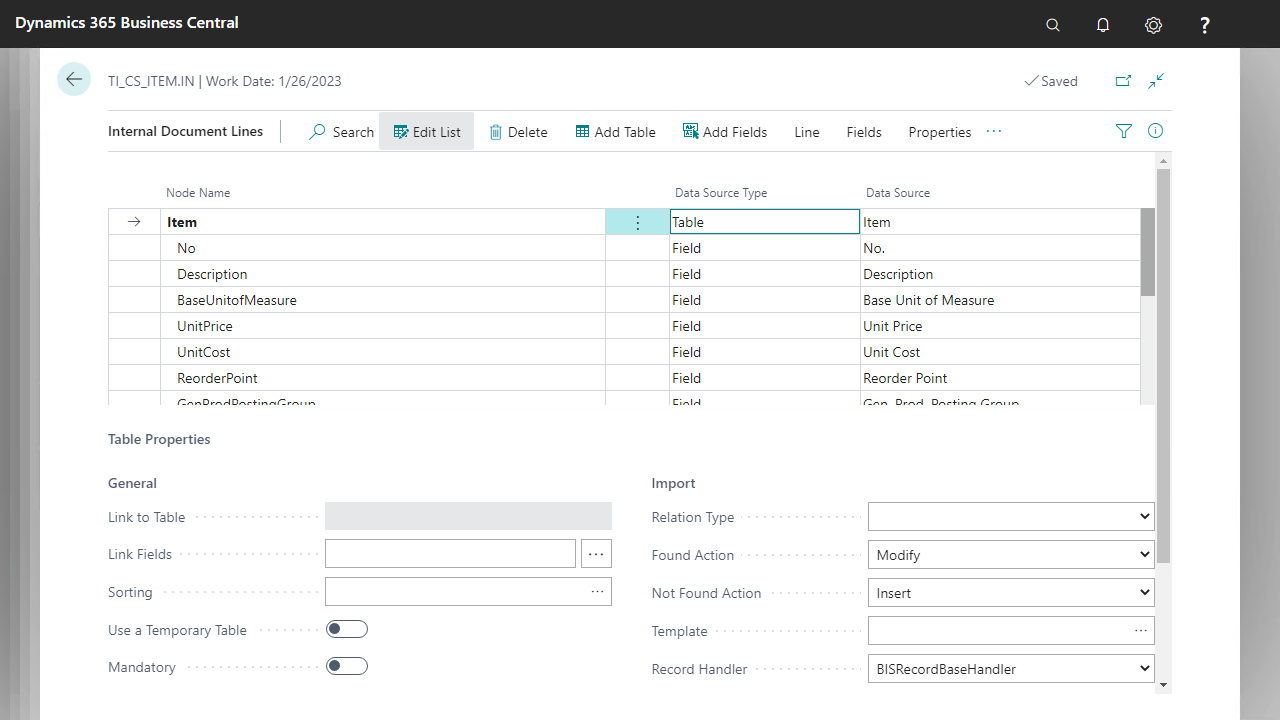
- Go to your Record Generator activity setup page and select the Design action for the linked document.
- On the document design page, select the table node where you want to use the new record handler.
Upgrading custom connectors
The following is an example of a legacy custom connector with the OnInsertRecord hook:
codeunit 50000 "DemoCustomConnector"
{
    procedure OnInsertRecord(var Rec: Item): Boolean
    begin
        // Your custom logic
    end
}
To upgrade this connector:
- Make the custom connector implement
BISIOnInsertRecord. - Implement the
OnInsertRecord(var RecRef: RecordRef)procedure by calling the legacyOnInsertRecord(var Rec: Item), or calling the default BISRecordHandler if the table is not supported by your logic:
codeunit 50000 DemoCustomConnector implements BISIOnInsertRecord
{
    procedure OnInsertRecord(var RecRef: RecordRef): Boolean
    var
        Rec: Record Item;
        Result: Boolean;
    begin
        if RecRef.Number() <> Database::Item then
            exit(BISRecordHandler.OnInsertRecord(RecRef));

        RecRef.SetTable(Rec);
        Result := OnInsertRecord(Rec);
        RecRef.GetTable(Rec);
        exit(Result);
    end;

    procedure OnInsertRecord(var Rec: Item): Boolean
    begin
        // Your custom logic
    end
}
Make sure to update
RecRefagain before exiting, using theRecRef.GetTableprocedure.
- Add the codeunit to an enum extension extending
BISRecordHandler:
enumextension 50000 "DemoRecordHandler" extends BISRecordHandler
{
    value(50000; DemoHandler)
    {
        Caption = 'Demo Record Handler';
        Implementation = BISIOnBeforeProcessRecord = "BIS RecordHandler",
                     BISIOnInsertRecord = DemoCustomConnector,
                     BISIOnModifyRecord = "BIS RecordHandler",
                     BISIOnDeleteRecord = "BIS RecordHandler",
                     BISIOnAfterProcessRecord = "BIS RecordHandler";
    }
}
One codeunit can implement several interfaces.