
Business Integration Solutions documentation
This is the on-premise version to overrule triggers during record generation. Please refer to Record Handler for the main version.
Custom Connector
A Custom Connector enables customizations for a specific table of an internal document.
Use a custom connector to implement specific functionality for a table of an internal document. The generic document processor (provided by the Record Generator activity) executes a certain processing workflow. This flow has a number of triggers, similar to the concept of C/AL triggers in the standard application. Use one of these triggers to include custom actions before or after a record processes, or to override the behavior of the standard insert, modify, or delete triggers. The following triggers are supported:
| ID | Name | Description |
|---|---|---|
| 1 | OnBeforeProcessRecord | Executes functions or manipulates field values before the record validates and updates. An example is a General Journal Line that needs a special Document No. In this trigger, field values are set but not yet validated. |
| 2 | OnInsertRecord | Overrides the Insert trigger of a record. BIS runs the OnInsert trigger of a record by default. Note: adding this trigger overrides the standard insert trigger. The record does not insert if this trigger does not perform an explicit INSERT statement. |
| 3 | OnModifyRecord | Overrides the Modify trigger of a record. BIS runs the OnModify trigger of a record by default. Note: adding this trigger overrides the standard modify trigger. The record does not modify if this trigger does not perform an explicit MODIFY statement. |
| 4 | OnDeleteRecord | Overrides the Delete trigger of a record. BIS runs the OnDelete trigger of a record by default. Note: adding this trigger overrides the standard delete trigger. The record does not delete if this trigger does not perform an explicit DELETE statement. |
| 5 | OnAfterProcessRecord | Executes after validating the record and updating the database. Use this to update related tables or run additional functions. |
When you enter the Custom Connector codeunit, the system shows you the list of triggers that are registered, as visible at the top of the screenshot below.
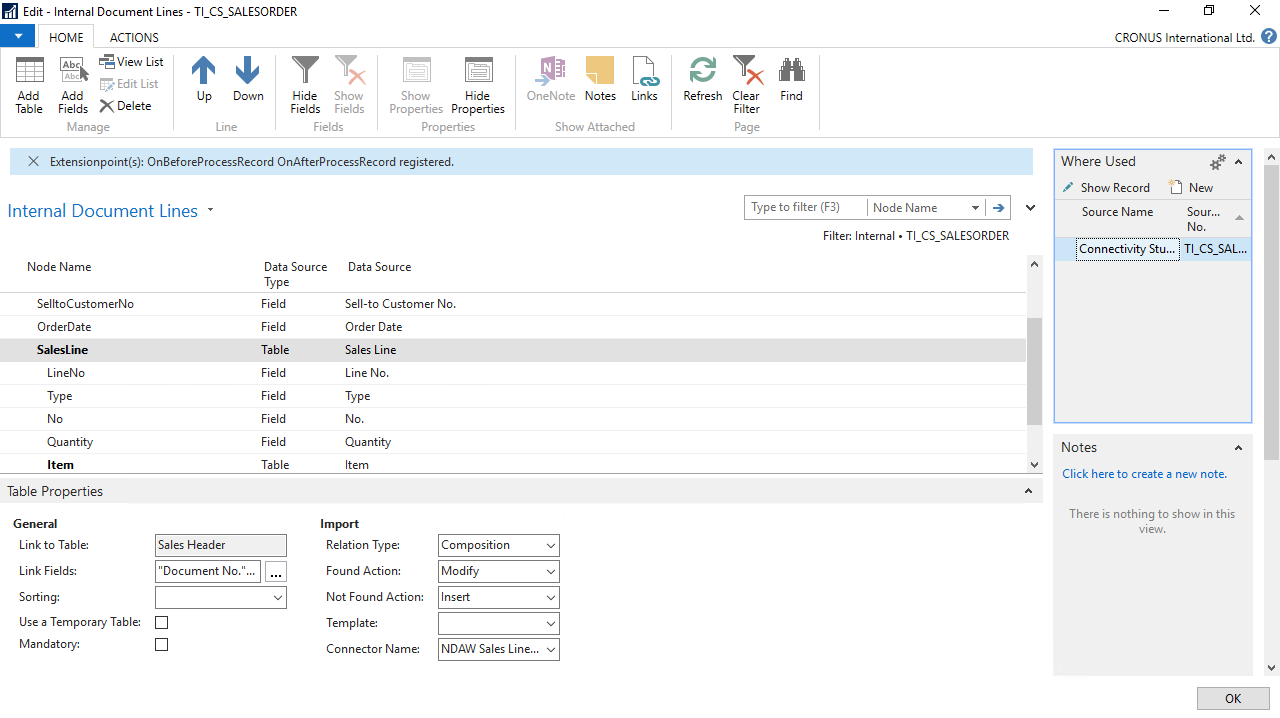
Custom Connector also supports codeunits in the extension (BC13 and above, on-premise). To achieve this, group all codeunits used by BIS in a single app with
"ShowMyCode"set to"True"in the app settings (app.json), so that BIS can read the codeunits and their functions.
For C/AL: custom connectors subscribe via the function ID. In AL, function names are leading.