
Anywhere Mobility Studio Documentation
License
Aside from the Business Central license (.flf/.bclicense), a Mobile Portal license must be present for the Anywhere solution to operate.
Request this license from the Business Central Support desk at the STAEDEAN Partner Portal. Both partner licenses and customer licenses must be requested and are issued and exchanged via email.
Migration steps are explained further on this page.
 Due to concerns from partners, STAEDEAN extended the grace period for version 1 licenses from the first of July to the first of October. A separate Portal release is available for download on our Partner Portal, which includes a script to update an environment without interruption. See Separate Portal.
| Migration on Business Central / NAV version |
|---|
| Business Central 13 and lower |
| Business Central 14 |
| Business Central 19 and higher |
Importing licenses
When you receive a license file, upload it in Business Central via the STAEDEAN Solution Management page. Both version types described in this document can be imported. You no longer need to deploy the license on the Portal. However, the Portal must be fully set up to communicate with the API.
License version 2
Since March 2023, a new license format is available: *.tilicense. This format is flexible and lets you load several licenses side by side for various products and different periods. The licenses are compounded, meaning that users defined on license A and license B are added together when both licenses are valid for the same period. This license type also specifies which types of users are available, matching with the order sheet.
This version is bound to the Voice Account of the customer, no longer to the server name of the environment where the portal runs, except in specific fallback scenarios.
The license checks have moved to the framework instead of the Portal, which lets several portals connect to the same Business Central instance under the same license.
When in doubt about which Voice Account number to use, a license request help action is available on the STAEDEAN Solution Management page.
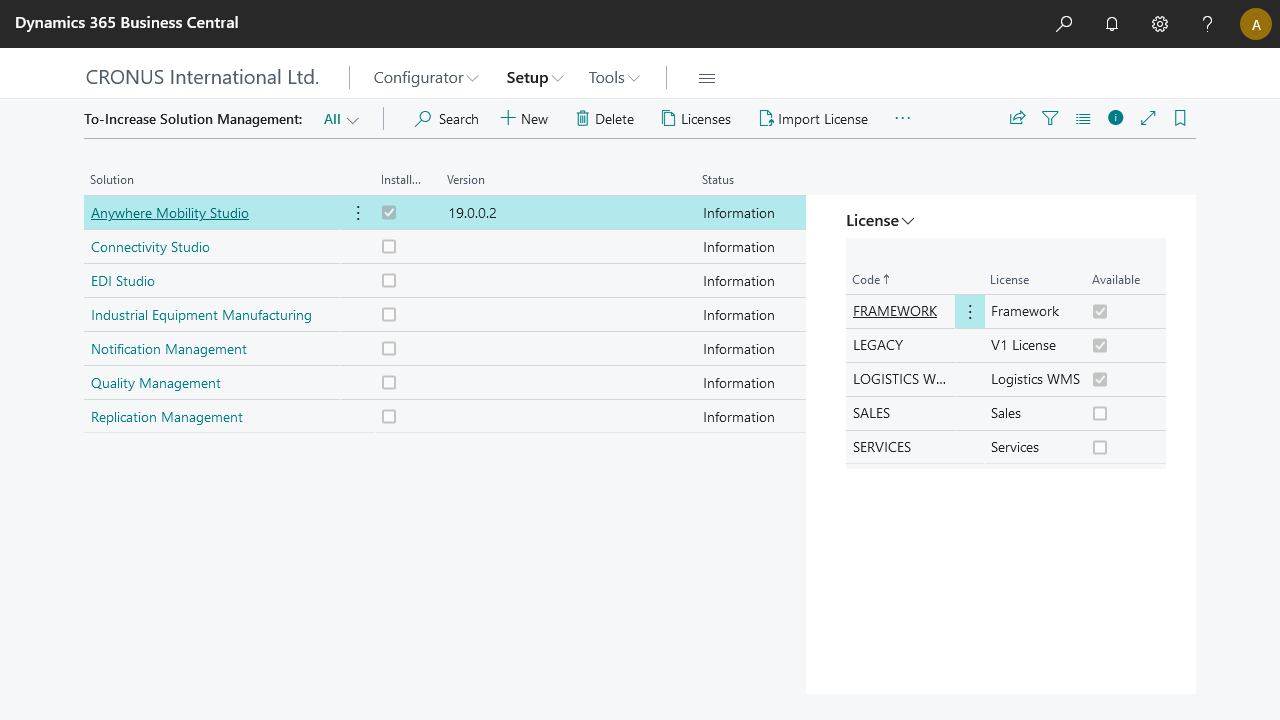
Loading the license file from the portal is possible, but the server name binding is reapplied.
License version 1 (deprecated)
These "old" licenses expire depending on the portal installed:
| Portal version | Expires on |
|---|---|
| Before March 2023 | 2023/04/01 (first of April) |
| March 2023 and later | 2023/10/01 (first of October) |
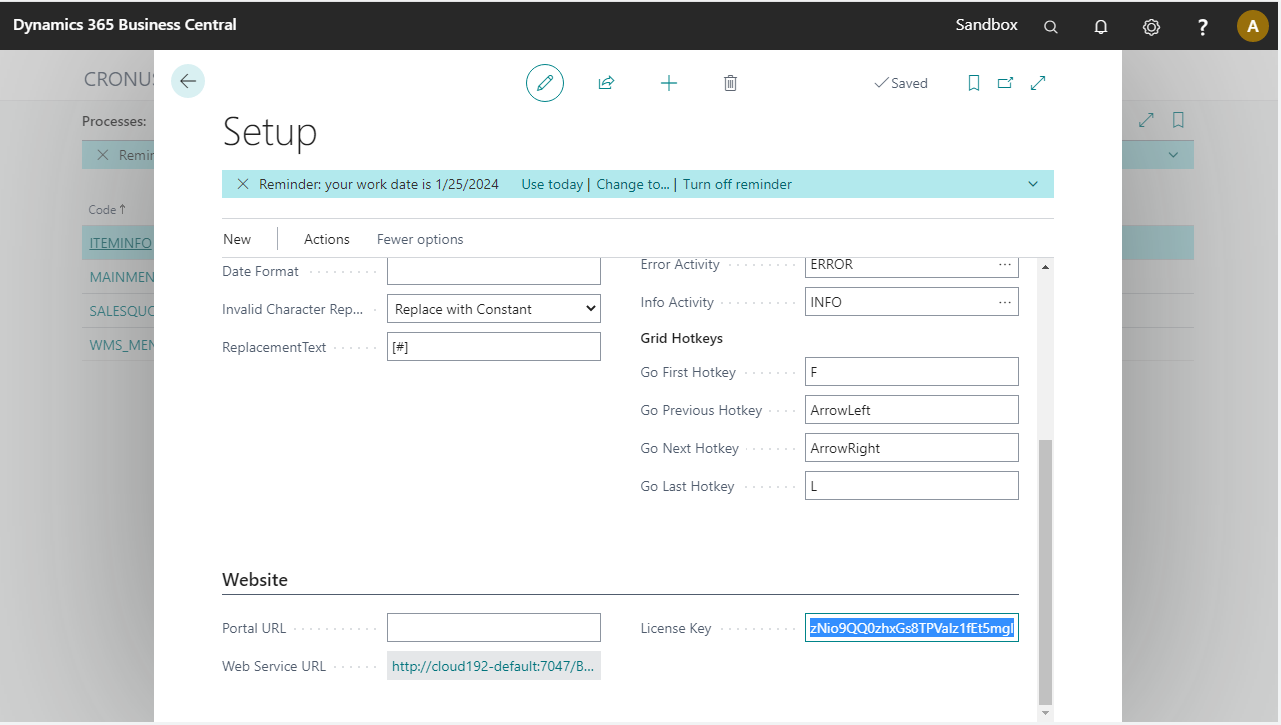
Add the received license key in the License Key field in the ANY Setup page (valid February 2022. March 2023). Since the March 2023 release, this license key is stored in the STAEDEAN Solution Management area as a version 1 license. This happens automatically when upgrading to this or a newer version, and the license key field is cleared.
License file (deprecated)
Old licenses are in the form of a file called License.dat. Place the License.dat in the folder C:\inetpub\wwwroot\DAW\PRD\Portal\Files.
New licenses are in the form of a file called <Your Company>.tilicense and must be uploaded to STAEDEAN Solution Center. If an older version or other limitations apply, place the *.tilicense file under \wwwroot\DAW\PRD\Portal\Files. When the tilicense has the same server name, the Portal uses that license, even when the setup points to a license.dat.
License File version 1: This method is deprecated and stops working on October 1, 2023 for any Portal linked to Business Central 14 and higher.
Upload the license file to STAEDEAN Solution Management to disable the license validation that version 2 enforces in the Anywhere Framework, except in BC14.
License File version 2: To support this license on older versions (Business Central 14), the new license file can be loaded in the Anywhere Portal from March 2023 onward.
For unsupported versions (Business Central 13 and older), STAEDEAN continues to support licenses on version 1.
Migration steps
This section describes which migration steps to take to move to the new license model, depending on which Business Central version Anywhere Mobility Studio runs on.
Anywhere Mobility Studio on Business Central 13 and lower
No migration or action is required.
The legacy Portal versions delivered with these versions do not have the expiration date hardcoded to 2023/04/01. When a newer portal is installed with an older Anywhere Framework, see the instructions for Anywhere on BC14.
For license requests on these versions, STAEDEAN delivers a version 1 license.
Anywhere Mobility Studio on Business Central 14–18
This applies to all Anywhere Mobility Studio versions for Business Central 14 up to Business Central 18.
Execute step 1 before 2023/04/01. Execute step 2 before 2023/10/01.
Update the Portal to the March Release Portal (see Separate Portal):
- The Portal is available in the Anywhere release packages for BC 21, BC 20, BC 19, and BC SaaS, or as a separate download.
- Save or back up the appsettings.config file.
- Back up the current license.dat file.
- Uninstall the old Portal.
- Install the new Portal.
- Update the application settings (copy the values from the backed-up appsettings.config file to the new application setup).
- Place the license.dat file in the Files folder under the Portal.
Request a new license. To expedite the procedure, send your current license with the request. This is a version 2 license file, bound to the server name (see License File (Deprecated)).
Replace the license file on the Portal:
- Remove the license.dat file.
- Add the *.tilicense file in the same folder.
The appsettings.config file references where the license.dat file is located. This setting does not need to be updated, when a .dat file cannot be found, the Portal retrieves all tilicense files under the defined folder.
Anywhere Mobility Studio on BC19 and higher
This applies to all versions, SaaS and on-premise.
Execute step 1 before 2023/04/01. Complete all upgrade and migration steps before 2023/10/01.
Update the Portal to the March Release Portal (see Separate Portal):
- The Portal is available in the Anywhere release packages for BC 21, BC 20, BC 19, and BC SaaS.
- Save or back up the appsettings.config file.
- Back up the current license.dat file.
- Uninstall the old Portal.
- Install the new Portal.
- Update the application settings (copy the values from the backed-up appsettings.config file to the new application setup).
To ensure the new license can be retrieved from the Anywhere Framework, set the APIBaseURL setting in the application.Update the Anywhere Framework to the latest version (version ##.#.8499#.0 or higher):
- On-premise: publish, sync, and install the app.
- SaaS: update Anywhere Mobility Studio via the Admin Center.
Upload your license file (license.dat) in the STAEDEAN Solution Management page. Even when the license is deployed on the portal, the license must be in STAEDEAN Solution Management to disable the license check in the Anywhere Framework. When you filled in the license key on the Anywhere Setup page, this step completed automatically during the update.
(Optional) Request a new license. To expedite the procedure, send your current license with the request.
Import the new license file. The old license file (legacy) is not removed. The tiers set up in the license become "available."
Remove the old license. The legacy license tier is no longer available.
Why this change
License model version 1 was unsustainable. The license check ran on the Portal, and the license was bound to the server where the Portal ran. This method did not scale. Each portal required a new license, and on Azure deployments, the licensed server occasionally changed on an app service restart, breaking the valid configuration.
License model version 2 is more flexible, does not require a license per Portal, and lets STAEDEAN issue several licenses matching each order. Partners can also reuse their license on a range of environments, including demos, development, or extended trials.
The goal for this model is to issue licenses in a matter of minutes after an order is submitted.