
STAEDEAN Lifecycle Base documentation
Lifecycle Base setup
STAEDEAN Lifecycle Base drives Business Central Workflows. Lifecycle Base is a common extension that works as a framework solution. You can extend it further in different products.
Workflows complete a specific task, mostly around approvals. Lifecycle Base is more versatile because it:
- Manages the life of a record with a status code.
- Tracks status changes of that record and shows the history of when and by whom the status changed.
- Assists users in business processes through pre-defined sets of state transitions.
Business Central Workflows are also called Sequential Workflows. Lifecycle Base represents the State Machine type of workflow. When you combine them, they work well together. They automate the approval request process by starting a workflow. When the workflow responds, the Lifecycle state changes based on that response.
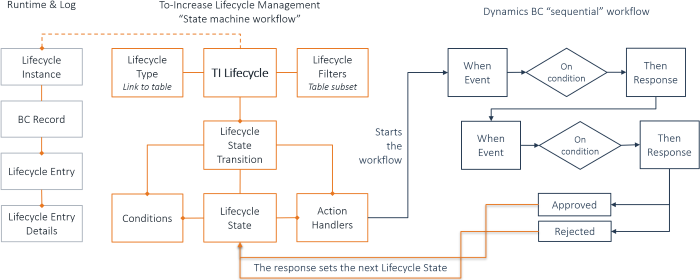
The Business Central workflow usually starts with Send Approval Request from the ribbon, for example on the Sales Order document. The same action is available as an Action Handler in Lifecycle Base: SendDocForApproval.
When a Lifecycle that contains this action handler is released, an event starts in the Business Central Workflow. For example, for items, the event is "Approval of an item is requested." This event starts the workflow.
Lifecycle Base states have an extra setting: Approval State. This setting marks a state as Approved or Rejected.
Workflows can place restrictions on records. These restrictions define what is restricted on the record. In Lifecycle Base, a restricted record cannot move to certain states. This means states marked as Approved or Rejected must also have a condition where an expression checks whether the record is restricted. If the expression returns true, the user cannot select that state.
The following table explains Lifecycle terminology:
| Lifecycle terminology | Description |
|---|---|
| Lifecycle Types | Set of functionality designed for a specific table (entity). |
| Lifecycle Base | Definition of states and state transitions based on the principles of state machine workflow. |
| Lifecycle State | Status code of a record, assigned through a state transition. |
| Lifecycle Transition | Change from one state to a new state (Lifecycle line). |
| Lifecycle State Settings | Set of settings specific to the Lifecycle type. |
| Lifecycle Filters | Filter to define a Lifecycle for a subset of the table. |
| Lifecycle Transition Conditions | Set of filters to be met before a transition completes. |
| To | See |
|---|---|
| Learn how to set up Lifecycle types | Set up Lifecycle Types |
| Learn how to set up Lifecycle Base | Create a Lifecycle |
| Learn how to set up Lifecycle states | Set up Lifecycle States |
| Learn how to set up Lifecycle state conditions | Set up Lifecycle Conditions |
| Learn how to set up transition actions | Set up Lifecycle Actions |
| Learn how to set up filters | Set up Lifecycle Filters |
| Learn how to set up state transitions | Set up Lifecycle State Transitions |
| Learn how to initialize Lifecycle Base | Initialize Lifecycle |
| View Lifecycle instances | View Lifecycle Instances |
| Learn how to perform a global state update for Lifecycle Base | Perform Global State Update |
| Learn how to add Lifecycle to a Microsoft Dynamics Business Central entity | Add Lifecycle to a Dynamics Business Central Entity |