
Microsoft Dynamics BC documentation
Replication Management
STAEDEAN Replication Management for Microsoft Dynamics BC replicates data from a central master data store to remote data stores. The solution brings together data from across the organization to support role-based ownership, sharing, publishing, and maintenance of accurate, current information.
Smooth business operations depend on whether people across several locations can work with current, integrated information. In many cases, this means rolling up data and publishing it from a central database or head office. STAEDEAN Replication Management offers a powerful solution for synchronizing information across decentralized databases and multi-site locations.
Replication Management has a broad application range, bringing together multi-company sites and remote users. Using Replication Management, you can exchange all kinds of data from Microsoft Dynamics BC with other databases, from product specifications and prices to customer, supplier, and contract information. Replication Management works with multi-company/multi-site Microsoft Dynamics BC implementations as well as for remote users such as service engineers.
Use Replication Management to keep data views up to date and identical across locations. After entering changes into the central database, you can choose when data publishes, with the assurance that synchronizations deliver up-to-date, identical information to all users. Replication Management simplifies the complex process of data management and keeps information current and accurate across your organization.
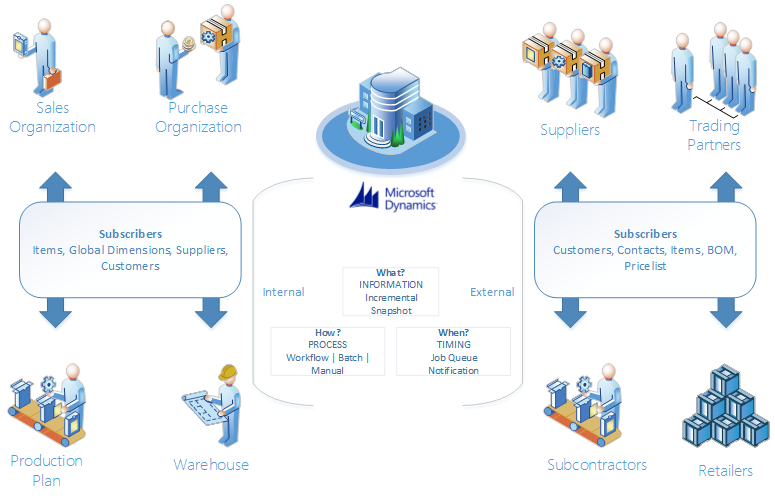
The replication scenario contains two parts: the publication and the subscription. The publication typically owns the data and sends all add, modify, and/or delete modifications. The subscriber can subscribe to the publication to import using a subscription. The advantage of global database triggers appears when renaming a key value. For example, at a multi-site customer, renamed records replicate and publish to decentralized companies. You can identify rename actions using the global database triggers. The result is included in the publication, and the subscriber adjusts to process the rename action correctly.